Baby Lock Enterprise 10-Needle Embroidery Machine Available Cert Required
Back to Equipment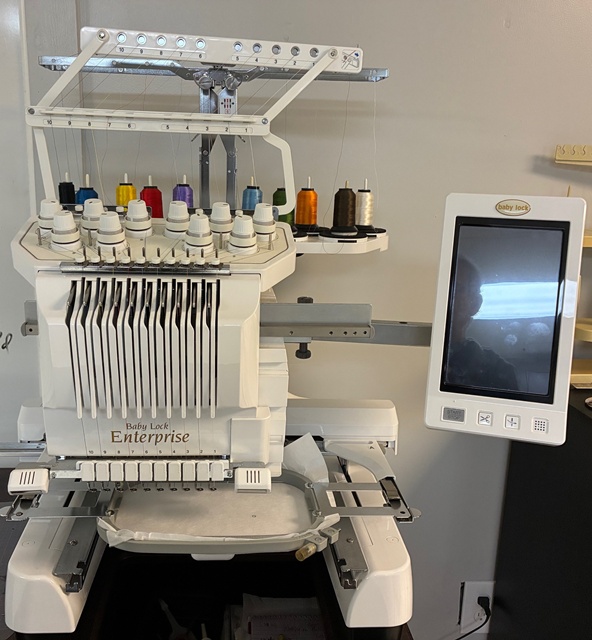
The Baby Lock Enterprise is a professional-grade 10-needle embroidery machine that delivers industrial-like power in a compact format. With 10 independently threaded needles and a speed of 1,000 stitches per minute, the Enterprise handles large multi-color designs with minimal setup or thread changes, making it ideal for detailed embroidery work and small production runs. The machine is powered by Baby Lock IQ Technology, which integrates smart features including the NeedleCam digital camera. The NeedleCam displays the needle area on the LCD screen, showing exactly where the needle will drop, and recognizes embroidery positioning stickers to automatically align designs with extreme precision. The Enterprise features comprehensive on-screen editing capabilities allowing users to combine, reposition, resize, rotate, and mirror designs directly on the built-in LCD display. Design elements can be grouped for quick editing. The machine includes 110 built-in embroidery designs, 3 monogramming fonts, and 120 frame patterns. Four embroidery hoops are included with the machine, and the optional 14 x 14 inch jumbo hoop is available for large projects such as jacket backs and quilt blocks. The front-loading bobbin system with vertical hook allows bobbin changes without removing the embroidery hoop. Designs are loaded via USB flash drive or transferred from a computer using the USB Type B connection. The machine reads PES, PEC, DST, and PHC embroidery file formats. Reservation is required before use.
- Reservation is required before using the embroidery machine. Check the reservation system for available time slots.
- Power on the machine using the power switch. Allow the machine to initialize.
- Select and thread the needles you will use for your design. The Enterprise has 10 needle positions — thread only the colors needed for your project. Route each thread through the guide path and thread the needle.
- Ensure a wound Style L bobbin is loaded in the front-loading bobbin case. The bobbin can be changed without removing the hoop.
- Select an embroidery hoop appropriate for your project size. Hoop your fabric with stabilizer backing, ensuring the fabric is taut and smooth.
- Attach the hoop to the machine's carriage frame.
- Load your embroidery design via USB flash drive (insert into Type A port) or transfer from computer via the Type B USB connection.
- Select your design on the LCD touchscreen. Use the on-screen editing tools to position, resize, rotate, or mirror the design as needed.
- Use the NeedleCam to verify needle placement and design alignment on your fabric. Adjust position if necessary.
- Assign thread colors to each needle position using the on-screen color assignment.
- Verify the LED spool lights match your intended thread color sequence.
- Press the Start button to begin embroidering. The machine will stitch at up to 1,000 stitches per minute and automatically pause for thread color changes between needle positions.
- Monitor the machine during operation. The machine will stop and alert you if thread breaks or bobbin runs out.
- When the design is complete, remove the hoop from the carriage. Remove the fabric from the hoop carefully.
- Trim any jump stitches or loose threads from the finished embroidery.
- Return all hoops, tools, and accessories to their storage locations. Power off the machine when finished.
- Sewing & Textiles Certification (Category)